Noted Nightwalker: A Halloween Color Font for Crafters
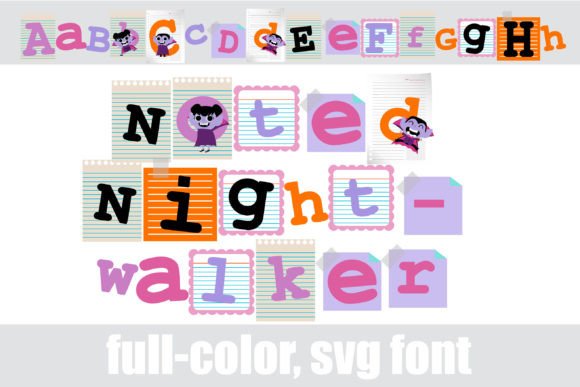
As someone who’s shipped over 3,000 handmade mugs, designed seasonal sticker bundles for Etsy, and prepped Cricut-ready vinyl kits for craft fairs, I opened Noted Nightwalker expecting whimsy—and got something sharper: a full-color font that feels like a midnight tea party with vampires. It’s not just spooky—it’s stylishly thematic, with tiny illustrated notes, bat silhouettes, and deep plum, burnt orange, and charcoal gray tones woven right into the glyphs. The mood? Playful but polished—think cottagecore meets gothic stationery. It leans feminine and festive without being cutesy, and it draws buyers who love intentional seasonal branding—not just generic “Halloween stuff.”
This isn’t a clipart pack or an SVG design you layer manually. Noted Nightwalker is a true OpenType color font (SVG format), meaning each letter renders with built-in color, texture, and detail—as if you typed “BOO” and got a ready-to-cut, ready-to-print Halloween vignette. You install it like any .otf font: double-click, hit “Install,” and it appears in Cricut Design Space, Silhouette Studio, Adobe Illustrator, and Canva. No unzipping, no dragging PNGs, no aligning layers. That simplicity saves real time when you’re batch-designing 47 gift tags for a local market pop-up.
Where Noted Nightwalker Shines in Real Handmade Workflows
Noted Nightwalker excels where color, theme, and instant visual impact matter most:
- Cricut & Silhouette projects: Cut it as a single-layer SVG text element on black vinyl for mugs or tumblers—no manual color separation needed. Works beautifully for tumbler wraps and tote bag appliqués when sized 2–4 inches tall.
- Sticker design: Perfect for planner stickers, enamel pin mockups, and kiss-cut sheets—especially when paired with minimalist borders or vintage-style frames. The built-in notes add charm without extra illustration work.
- Printable designs: Use it in printable wall art, Halloween party invitations, and digital gift tags. At 300 DPI and properly embedded, it holds crispness on matte cardstock and glossy sticker paper alike.
- Sublimation design: Tested on white ceramic mugs and polyester totes—colors stay rich and saturated, with no banding or transparency glitches when exported correctly from Illustrator.
- Small business branding: I used it for limited-edition October packaging labels and thank-you cards. Customers commented on how “cohesive” and “on-brand” the whole collection felt—even though it was just one font + two neutral sans serifs.
Where to Use Noted Nightwalker With Care
Color fonts are powerful—but they’re not magic wands. Here’s where I slowed down and adjusted:
- Very small cuts: Below 0.5 inches tall, the fine details (like tiny bats or note stems) get lost in Cricut’s cut preview and may not register cleanly on vinyl. I avoid using it under 0.75" for physical cutting unless simplifying the glyph first.
- Crowded compositions: Layering Noted Nightwalker over busy backgrounds (e.g., floral sublimation patterns) can muddy contrast. I always test print on both white and dark substrates—and often drop a subtle white stroke or shadow behind the text for legibility.
- Layered vinyl projects: Because it’s a single-color-font layer, you can’t easily recolor individual elements mid-design. If your customer wants “purple bats but gold notes,” you’ll need to trace and separate—so I clarify expectations upfront in my Etsy listings.
- Low-resolution mockups: Some free product mockup generators don’t render SVG fonts accurately. Always place the live font file into a high-res PSD or use Cricut’s native mockup tools before finalizing a listing image.
Practical Crafter Notes Before You Sell
I treat every new graphic design asset like a new team member—test it, trust it slowly, and document what works. Here’s my checklist for Noted Nightwalker:
- Test the file first: Made three sample mug designs—one with default settings, one with simplified spacing, one with manual kerning—and compared them side-by-side after printing.
- Check SVG line integrity: Imported into Silhouette Studio and ran “Trace” > “Outline” to confirm no stray anchor points or overlapping paths that could cause cut errors.
- Preview PNG transparency: Exported as PNG-24 with alpha channel—verified clean edges and no halos around the notes or bats.
- Confirm sublimation resolution: Set document to 300 DPI at actual print size; avoided scaling up after export.
- Test colors on real products: Printed on white cotton tees, navy totes, and matte kraft tags—adjusted brightness slightly in Lightroom for the dark backgrounds.
- Place on authentic mockups: Used layered PSD mockups (not flat JPEGs) to see how shadows and folds interact with the color glyphs.
- Resize intentionally: Found sweet spots: 1.25" for jar labels, 2.5" for greeting card headers, 4" for banner letters.
- Pair thoughtfully: Works best with clean sans serifs (like Montserrat or Poppins) for body text, and delicate script fonts (like Adorn) for accents—not competing display fonts.
- Verify commercial license: Confirmed the license explicitly covers customer orders, Etsy products, craft fair sales, and print-on-demand. Saved the PDF license in my business asset folder.
If you’re building a seasonal design bundle—or launching a Halloween-themed digital product on Creative Market—Noted Nightwalker adds instant personality without extra illustration hours. It’s not a replacement for custom hand-drawn assets, but it *is* a reliable, licensable, production-ready tool that bridges the gap between quick-turnaround craft jobs and cohesive handmade business branding. For Etsy sellers juggling 12 product lines and a toddler, that kind of efficiency isn’t just nice—it’s necessary.
Bottom line? Noted Nightwalker earned its spot in my active font library—not as a novelty, but as a working asset for real handmade business needs. It’s the kind of Fonts investment that pays off across mugs, stickers, printable planners, and gift tags… all while keeping your Halloween collection feeling intentional, on-brand, and unmistakably yours.